Prepare and annotate data
Use this workflow to turn exported notes into a reviewed dataset for training, evaluation, or research. The notes stay on your machine: Python commands prepare the files, and local browser applications let reviewers inspect and correct them.
source notes → imported dataset → optional fixed split → reviewer assignments
             → human review → optional curation → optional detailed labels
If you only want to de-identify notes and do not need a reviewed dataset, use Local inference instead.
Choose the path you need
| Your goal | Follow this path |
|---|---|
| Create one reviewed collection | Import → open an assignment → review → export |
| Prepare data for training and evaluation | Import → split → open and review one assignment per split → export |
| Reconcile two or more reviewers | Complete the path above for every reviewer, then curate each split separately |
| Add character-level benchmark labels | Start from completed primary annotations, then use subannotation |
Curation and detailed subannotation are optional. A project with one authoritative reviewer can stop after exporting the completed assignment.
Before you begin
For an end-to-end research project, create a virtual environment and install the compatible Python tools together:
python3 -m venv .venv
source .venv/bin/activate
python -m pip install --upgrade pip
python -m pip install 'meddeid[research]'
If you only need to import data, install the smaller meddeid-data package:
Install meddeid later only if assignments should begin with model
suggestions. The browser applications run through one Docker Compose setup and
are not installed by pip.
Keep clinical data local
The browser applications have no built-in user authentication. The commands below bind them to localhost. Run them on an approved machine and do not expose their ports to a network. See Privacy and security for the wider data-handling boundary.
1. Import the source notes
Owner: meddeid-data
Create a project and import a table by identifying its document-ID and text columns:
meddeid-data project create my-project notes.csv \
  --namespace hospital-study \
  --language-profile nl-BE \
  --id-column note_id \
  --text-column note_text
The same command accepts:
- CSV or TSV tables;
- Parquet tables after installing
meddeid-data[parquet]; or - a directory of UTF-8
.txtfiles.
For a text-file directory, omit the column options. For a table, columns other
than the selected ID and text columns are retained as document metadata by
default. More complex patient and caregiver column mappings are documented in
the meddeid-data import guide.
The import creates my-project/artifacts/annotations.jsonl: one standardized
record per note, ready for inference and review. It also creates a manifest
that records how the source was imported.
If an existing JSONL already has one document per line but uses field names
such as doc_id, raw_text, or start_char, use the limited normalizer
described under Standardize supported field
names. It is
not the importer for CSV, Parquet, or text-file directories.
Protect the source mapping
MedDeID replaces source IDs with stable project IDs. The private key and the
mapping back to the source records are stored under my-project/private/.
Protect the private directory
The private mapping can reconnect project IDs to source records. Keep it inside the approved data boundary, restrict access, and back it up with the project. Do not include it in a dataset release.
If the first import fails
A failed first import keeps the empty project and its private key. Correct
the column mapping and repeat project create with the same namespace and
language profile, or run the recovery command printed by MedDeID:
```bash
meddeid-data project import my-project notes.csv \
  --id-column note_id \
  --text-column note_text
```

Once a project contains imported, split, or reviewed data, `project create`
will not overwrite it. Use `project import` only when you deliberately want
to replace the imported dataset.
2. Fix the split before review when training
Skip this step when you need one reviewed collection rather than separate training and test data.
For model training, domain adaptation, or a formal evaluation, assign the documents to their roles before model output or reviewer observations can influence the choice:
This writes train.jsonl, validation.jsonl, and test.jsonl under
my-project/splits/. The remaining 10% becomes the test set.
These files fix which documents have each role; they are not the files that reviewers edit. Training decisions may use the train and validation results. Keep the test annotations separate until the model and evaluation procedure have been fixed.
3. Choose the reviewer's starting data
Annotate imports a JSONL file and creates a separate working assignment inside its workspace. The imported source stays unchanged. Model suggestions are identifier spans that a model has already highlighted for the reviewer to check. Without suggestions, the note text is present but the reviewer starts with no highlighted identifiers and marks every identifier themselves. Either route still requires review of the complete text.
Option A: begin with model suggestions
Install inference if it is not already available:
For one unsplit collection:
mkdir -p my-project/review-inputs
meddeid batch my-project/artifacts/annotations.jsonl \
  --output my-project/review-inputs/all-with-suggestions.jsonl \
  --model stighellemans/meddeid-dutch-synth
For a split project, prepare train and validation with suggestions. Keep the test input free of predictions from the system that will be evaluated:
mkdir -p my-project/review-inputs

for split in train validation; do
  meddeid batch "my-project/splits/${split}.jsonl" \
    --output "my-project/review-inputs/${split}-with-suggestions.jsonl" \
    --model stighellemans/meddeid-dutch-synth
done
Import my-project/splits/test.jsonl directly when creating the test
assignment. This keeps errors from the evaluated system from steering its gold
labels. Suggestions from a different system are appropriate only when the
study design permits and records that choice.
The example model is a Dutch synthetic-data baseline. Choose a model and language profile that match the notes, and prefer an institution-validated bundle when one is available. Suggestions are only a starting point: reviewers must correct missed, unnecessary, mislabelled, or incorrectly bounded spans.
Option B: begin without model suggestions
Skip meddeid batch. In Annotate, choose Import dataset and select the
original annotation-ready file:
# One collection
my-project/artifacts/annotations.jsonl

# Or one part of a split project
my-project/splits/test.jsonl
The notes open without pre-highlighted identifiers, so the reviewer marks all identifier spans manually. Annotate preserves the imported file and saves the work in its own assignment.
Keep reviewers independent
Create a separate workspace assignment for every reviewer. Two reviewers may
import the same starting JSONL, but each assignment needs its own name, such as
Train · Reviewer A and Train · Reviewer B. Never ask two reviewers to open
the same assignment: their work must remain independent until curation.
4. Start the workspace and review
Owner: meddeid-annotate
The suite provides one Compose setup for all three browser tools. Run the
following commands from the directory that contains
compose.annotation-workspaces.yaml. Set the workspace to an absolute path
inside your project, then start the services once:
export MEDDEID_ANNOTATION_WORKSPACE="$PWD/my-project/browser-workspace"
docker compose -f compose.annotation-workspaces.yaml up --detach --build
This starts three containers; the single Compose command manages them together:
| Application | Address | Purpose |
|---|---|---|
| Annotate | http://127.0.0.1:5186 |
Review primary identifier spans |
| Subannotate | http://127.0.0.1:5187 |
Add optional detailed benchmark labels |
| Curate | http://127.0.0.1:5188 |
Reconcile independent reviewers |
The screenshots below show the released 0.3.1 applications with synthetic clinical examples. No real patient data is shown.
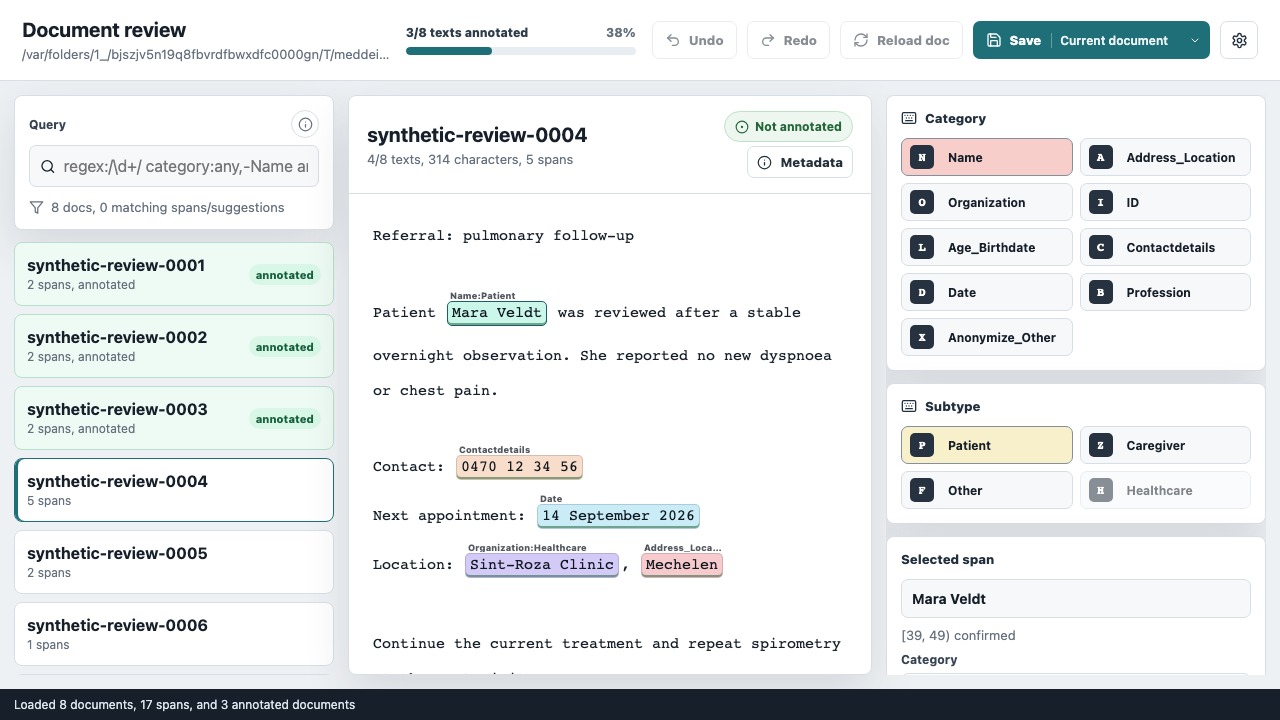
Annotate: review the complete note while adding, removing, resizing, or relabelling primary identifier spans.
Open Annotate and choose Import dataset. Select the starting JSONL from
step 3, then give it a recognizable dataset and assignment name—for example,
Hospital study and Train · Reviewer A. Each import creates an isolated
assignment with its own preserved source, working copy, progress, and exports.
The assignment library lets reviewers switch work in the browser. It restores the saved review and last document when they return. If the current document has unsaved changes, use Save & switch. Downloading a bundle is not needed to save or resume work.
Expand Workspace when you need to change the assignment, inspect storage, or export a bundle.
The document list lets a reviewer choose what to work on, filter the list, and optionally continue to the next pending document after saving. For each document:
- read the complete text, not only the highlighted spans;
- add, remove, relabel, or resize spans as needed; and
- save the document to mark that complete text as reviewed.
Save documents that contain no identifiers as well. Their empty spans list
plus completed state records that a person reviewed the text and found
nothing — it is different from a document nobody has checked yet.
5. Keep or export a completed assignment
Annotate continuously saves work inside the mounted workspace. Open Files & results to see the exact source, working, and export locations.
Once every document is reviewed, choose Export bundle. The timestamped ZIP contains:
- the preserved source JSONL;
- the completed
annotations.jsonl; annotations.manifest.json, which records its checksum and data contracts;- the saved working state; and
- a workspace manifest describing the assignment and review progress.
An export made before review is complete is clearly marked as an in-progress snapshot and is not a completed annotation set. Exporting is optional for ordinary saving and resuming; use it when the result must leave the workspace, be retained as a portable snapshot, or move outside this shared workspace. Curate and Subannotate can select completed assignments directly.
Use a pseudonymous reviewer ID in the assignment name or study record rather
than a name or email address. If one reviewer is authoritative, their completed
annotations.jsonl is the reviewed result and curation can be skipped.
6. Reconcile multiple reviewers only when required
Owner: meddeid-curate
Use meddeid-curate when two or more people independently reviewed the same
documents. It retains exact agreement automatically and asks a curator to
decide where their spans differ.
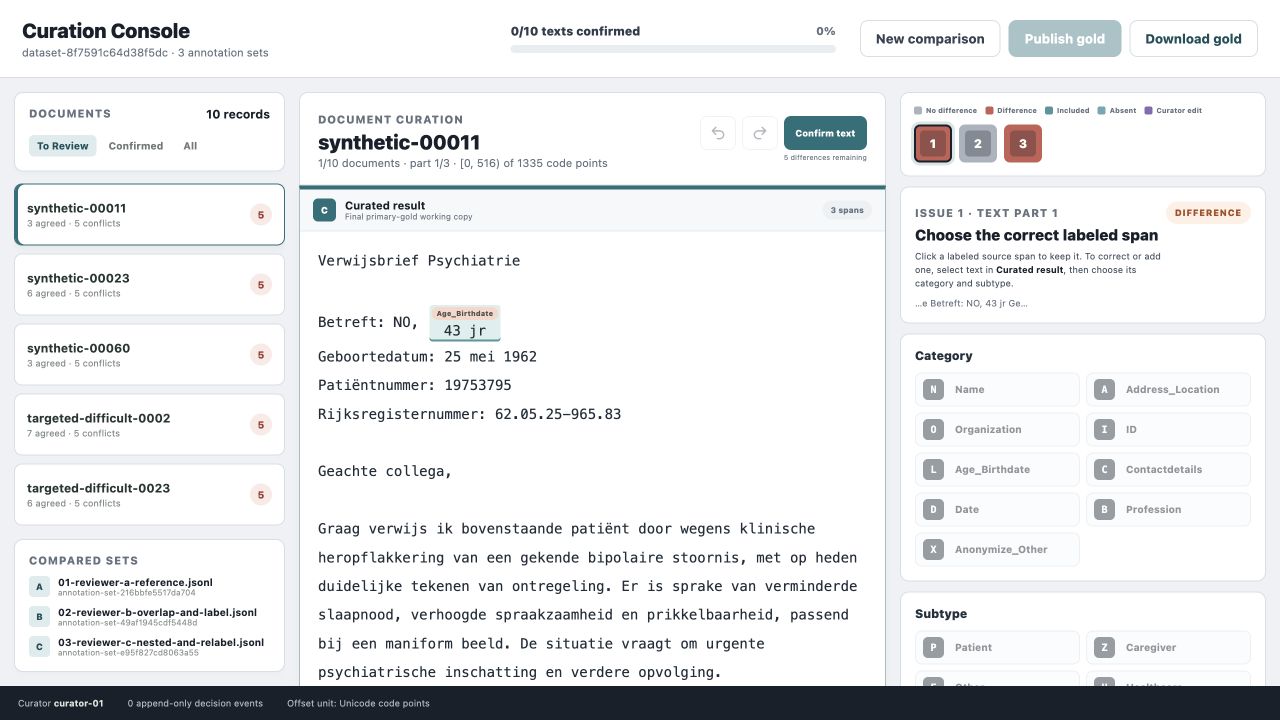
Curate: compare independent reviewer lanes, resolve only their differences, and confirm the whole document before publishing gold data.
Open Curate at http://127.0.0.1:5188 and choose New comparison → From
workspace. Select the completed reviewer assignments for one split, then
enter a dataset name, comparison name and pseudonymous curator ID. Every
selected assignment must contain the same document IDs and unchanged text.
Explicit split labels must agree. Curate keeps frozen input copies with their
assignment identities and checksums; downloading, extracting, renaming or
repackaging reviewer files is not required.
Use Import files when completed reviewer JSONLs and matching manifests come from outside this shared workspace. Those input filenames must be unique.
The document list lets the curator choose the current document and filter the list to To review, Confirmed, or All. Documents may be handled in any order. Resolve the differences, inspect the complete text, and confirm each document. Publishing remains unavailable until every document in this comparison is confirmed.
Publishing preserves a finalized version under the comparison's own folder:
my-project/browser-workspace/curate/<comparison-id>/
├── assignment.json
├── inputs/                              # frozen reviewer inputs
├── work/project.json                    # saved decisions and progress
└── results/<version>/
    ├── annotations.jsonl
    ├── decisions.jsonl
    ├── manifest.json
    └── result.json
annotations.jsonl is the curator-approved primary gold. decisions.jsonl
records how disagreements were resolved, and the manifests bind the result to
its inputs and checksums. Files & results shows the exact paths and
preserved versions. Export a bundle when a portable copy is needed.
Use Workspace to switch comparisons or return to All comparisons. Starting a comparison for validation or test keeps the existing comparison and its audit history. Later edits require publishing a new version; previous finalized versions remain available. There is no manual archive step and no container restart between splits.
These workspace features are provided by the local Compose builds. Standalone
Curate without MEDDEID_WORKSPACE_DIR still uses the legacy single-project
workflow. A previous curate/project.json in the shared workspace is copied
once into the comparison library, leaving the original files untouched.
7. Add detailed labels only for detailed evaluation
Owner: meddeid-subannotate
Ordinary training and span-level evaluation do not require this step.
meddeid-subannotate divides confirmed identifier spans into smaller character
segments for benchmarks that measure exactly which parts were removed.
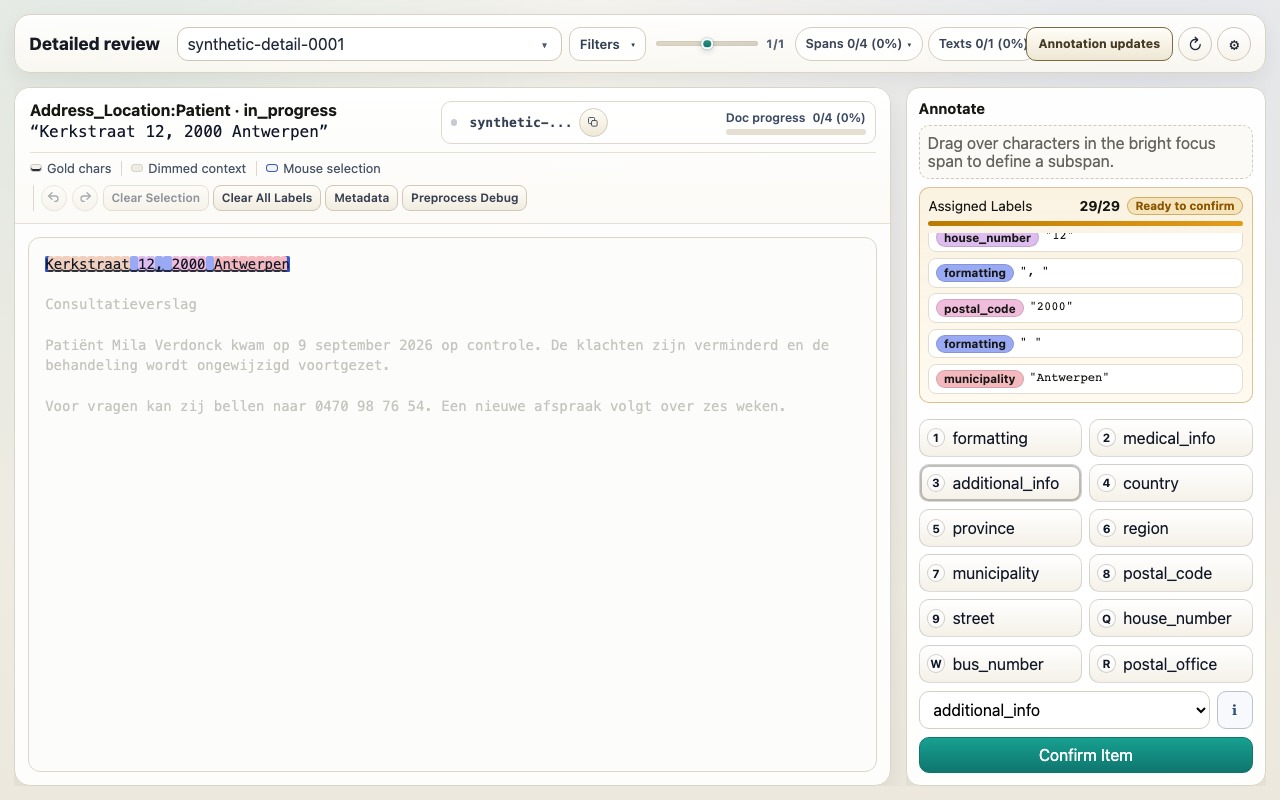
Subannotate: divide a confirmed primary identifier into categories such as house number, postal code, municipality, and formatting for fine-grained evaluation.
In Curate, choose Workspace → Continue in Subannotate after publishing.
Alternatively, open Subannotate at http://127.0.0.1:5187 and choose From
workspace. Select a finalized curation version or a completed authoritative
reviewer assignment, give the detailed review a name, and open it. If that
exact source already has a detailed review, the picker offers Resume saved
review. Use Import dataset for completed JSONL from elsewhere.
Each detailed review keeps a fixed snapshot of its primary annotations and the selected source version. Later curation changes do not silently rewrite its labels. Use Source updates to preview and apply the new finalized version to this same detailed review, or create a separate review when a distinct independent result is wanted. Train, validation, test and separate curation rounds can be resumed without restarting Docker or replacing one another.
As in Annotate, switch assignments through the workspace controls and use Files & results to inspect storage. Export a bundle when a portable or final result is needed. New reviews automatically inherit the project's language from the documents. The application includes English (UK/US) and Dutch (Belgium/Netherlands) suggestion profiles; mixed languages are handled per document. Files & results shows the inherited profile, which is pinned for that review. Existing reviews keep their previous configuration. If language metadata is missing, ambiguous, or unsupported, Subannotate explains the problem and offers an explicit language-neutral fallback before creating the review. Reviewers do not need to install language packages or configure profiles themselves.
Correcting inputs during ongoing review
Curate and Subannotate check their linked workspace sources when a review opens, when you return to the tab, and every 30 seconds while it is visible. The compact Newer source available button appears in the original editor toolbar; expanding the workspace header is unnecessary.
For a saved review, click that button to prepare the impact preview, then Update this review. If edits remain unsaved, choose Save & preview update first. The assignment keeps its name, ID and place in the workspace. No bundle handling or new container is required, even across frequent corrections.
- Curate: compatible decisions, curator-added spans and overrides are carried forward. Changed documents lose their whole-document confirmation; unchanged documents keep it. Unsafe or ambiguous decisions require review. Confirm the affected documents and publish a new result before Subannotate can use it.
- Subannotate: compatible detailed labels and confirmations survive. Changed text, labels or unsafe span matches require review. The editor opens the first remaining item that needs attention. The review's suggestion profile stays pinned; incompatible language changes are blocked rather than silently changing rules.
The preview lists the impact and affected documents/spans. If the source or your saved review changes again before applying, refresh the preview. Tabs that still have the previous review revision cannot save over the updated review.
Source updates → Recovery versions retains the state before every update. Restoring a version first retains the current state, so recovery is reversible. Unchanged recovery files share stored copies; there are no nested full-workspace backups. Recovery is retained with the assignment, including in Trash. Published Curate versions and existing downloaded exports remain available. Unpublished curation edits, unfinished sources and removed sources never silently replace a Subannotate review's input.
Understand the resulting project
A split, independently reviewed, and curated project will contain files like:
my-project/
├── artifacts/annotations.jsonl        # imported records; keep unchanged
├── splits/                             # fixed train, validation, and test roles
├── review-inputs/                      # optional model suggestions
├── manifests/                         # import, split, and annotation-set records
├── private/                           # protected link to source identifiers
└── browser-workspace/
    ├── annotate/<assignment-id>/       # preserved input and reviewed working copy
    ├── curate/<comparison-id>/         # frozen inputs, decisions and finalized versions
    └── subannotate/<assignment-id>/    # pinned input and detailed review
What to use next
| Your next goal | Input to keep |
|---|---|
| Train or adapt a model | Authoritative train and validation JSONL files, their manifests, and the fixed split record |
| Evaluate a model | Authoritative test JSONL and manifest; add subannotations only when the metric requires them |
| Preserve or hand off the dataset | Every authoritative JSONL with its manifest and, when curated, its decision log |
| Reconnect results to hospital records | The protected private/ mapping, kept separately from shared dataset artifacts |
Continue with Train and evaluate when the reviewed train, validation, and test results are ready. See Artifact lineage for how manifests connect the files created at each stage.